Free Tool
MRR Screenshot Generator
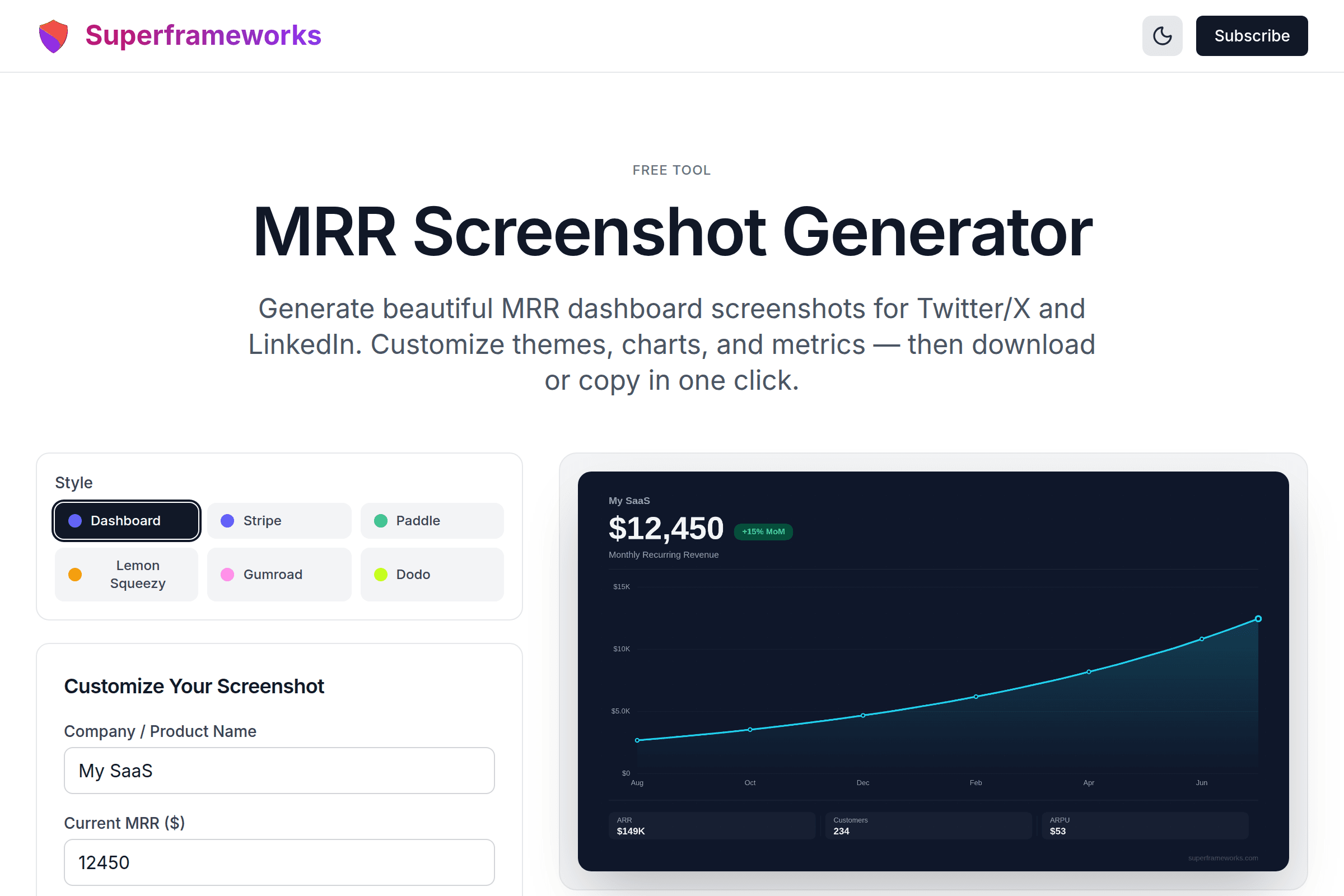
Generate beautiful MRR dashboard screenshots for Twitter/X and LinkedIn. Customize themes, charts, and metrics — then download or copy in one click.
Customize Your Screenshot
Quick Presets
Image exports at 2400x1350px (retina quality) for crisp sharing on Twitter/X and LinkedIn.
What You'll Get
Everything you need to create and share professional-looking revenue screenshots.
Retina-Quality Export
2400x1350px images that look crisp on every device and social media platform.
5 Professional Themes
Midnight, Clean, Ocean, Sunset, and Forest — each carefully designed for visual impact.
Growth Visualization
Smooth area or bar charts showing your MRR trajectory over 6 or 12 months.
One-Click Download
Download as PNG or copy directly to clipboard for instant sharing.
Social-Optimized
16:9 aspect ratio perfect for Twitter/X, LinkedIn, and other social media feeds.
Full Metrics Dashboard
Shows MRR, ARR, growth rate, customer count, and ARPU in a professional layout.
How It Works
Enter Your Metrics
Add your company name, current MRR, growth rate, and customer count.
Pick a Theme
Choose from 5 professionally designed color themes that match your brand.
Preview Live
See your screenshot update in real-time as you adjust every setting.
Download & Share
Download the PNG or copy to clipboard and share on Twitter/X or LinkedIn.
Perfect For
Whether you're celebrating milestones or building in public, create screenshots that get engagement.
Build in Public
Share your revenue milestones with the indie hacker community. Beautiful screenshots get more engagement.
- Monthly revenue updates
- Milestone celebrations
- Growth trajectory proof
Social Media
Create scroll-stopping revenue screenshots that stand out in crowded social media feeds.
- Twitter/X revenue posts
- LinkedIn growth stories
- Community forum updates
Investor Updates
Include professional revenue charts in investor updates, pitch decks, and board presentations.
- Monthly investor emails
- Pitch deck visuals
- Board meeting slides
Tips for Sharing MRR Screenshots
Maximize engagement when sharing your revenue milestones on social media.
Use the dark theme for Twitter/X — it blends naturally with dark mode feeds and stands out in light mode
Share round-number milestones ($1K, $5K, $10K MRR) — they get significantly more engagement
Add context in your post about what drove the growth, not just the numbers
Post at peak hours (8-10am or 12-2pm EST) for maximum visibility in the founder community
Tag your post with #buildinpublic and #indiehackers to reach the right audience
Use the clean theme for LinkedIn — it looks more professional and corporate-friendly
Include your product name in the screenshot so people can find you
Share both wins and losses — authenticity builds trust and gets more engagement
Use the bar chart for shorter timeframes and area charts for showing long-term trends
Celebrate small wins too — going from $0 to $100 MRR is a massive achievement worth sharing
Why Founders Share Their MRR
Building in Public Works
The #buildinpublic movement has shown that transparency about revenue drives real business results. Founders who share their metrics regularly report more customer leads, partnership opportunities, and community support. A well-designed MRR screenshot is the simplest way to participate.
Social Proof Drives Growth
When potential customers see your growing revenue, it signals that your product delivers value. Revenue screenshots serve as powerful social proof — they tell the story of a product that people are willing to pay for month after month.
Accountability and Motivation
Sharing your numbers publicly creates accountability. When your community expects monthly updates, it motivates you to keep pushing. Many founders credit their public revenue sharing as a key factor in staying consistent with their product development.
Attract the Right Opportunities
Revenue screenshots attract investors, potential co-founders, advisors, and acquirers. They provide instant credibility in conversations about your business. A professional-looking chart communicates that you take your business seriously and understand your key metrics.
Want More SaaS Growth Tips?
Join thousands of indie hackers and SaaS founders getting actionable growth strategies every week.
See the MRR Screenshot Generator in action
Explore Related Tools
Discover more tools to help you build and grow your business
MRR Calculator
Calculate and forecast your Monthly Recurring Revenue with detailed metrics and growth projections.
ROAS Calculator
Calculate your Return on Ad Spend (ROAS) to measure advertising effectiveness and optimize campaigns.
Business Ideas Generator
Generate profitable business ideas tailored to your interests, skills, and market trends.
Business Plan Generator
Create comprehensive business plans with market analysis, financial projections, and growth strategies.
Frequently Asked Questions
What is an MRR screenshot generator?
An MRR screenshot generator creates beautiful, shareable images of your Monthly Recurring Revenue metrics. It produces professional-looking dashboard screenshots with your MRR, growth rate, ARR, and a revenue chart that you can share on social media platforms like Twitter/X and LinkedIn.
Is this tool free to use?
Yes, the MRR Screenshot Generator is completely free. You can create unlimited screenshots with different themes, customize all metrics, and download high-resolution PNG images without any cost or sign-up required.
What resolution are the exported images?
Images export at 2400x1350 pixels (2x retina quality), which ensures they look crisp and professional when shared on Twitter/X, LinkedIn, and other social platforms. The 16:9 aspect ratio is optimized for social media feeds.
Can I customize the colors and theme?
Yes, the tool offers 5 professionally designed themes: Midnight (dark navy), Clean (white), Ocean (deep blue), Sunset (purple/pink), and Forest (dark green). Each theme is carefully crafted to look stunning when shared on social media.
What metrics are displayed in the screenshot?
The screenshot displays your company name, current MRR (Monthly Recurring Revenue), month-over-month growth rate, a revenue growth chart (area or bar), ARR (Annual Recurring Revenue), total customer count, and ARPU (Average Revenue Per User).
Can I choose between different chart types?
Yes, you can switch between an area chart (with a smooth gradient fill) and a bar chart. Both chart types show your MRR growth trajectory over 6 or 12 months with professional styling.
What currencies are supported?
The tool supports three currencies: USD ($), EUR (€), and GBP (£). Select your currency and all values in the screenshot will be formatted accordingly.
How is the growth chart calculated?
The chart works backwards from your current MRR using the monthly growth rate you specify. For example, if your current MRR is $10,000 with 15% monthly growth, the chart calculates what your MRR was in previous months to show the growth trajectory.
Can I copy the image to my clipboard?
Yes, click the "Copy to Clipboard" button to copy the screenshot directly to your clipboard. You can then paste it into Twitter/X, LinkedIn, Slack, or any other application that supports image pasting.
What are the quick presets for?
Quick presets let you instantly populate the tool with typical SaaS milestone values - from "Side Project" ($500 MRR) to "Series A" ($100K MRR). They are great for quickly testing different themes or seeing what your future milestones could look like.