
Onepage Review 2026: Is This AI Website Builder Worth It?
Hands-on Onepage review for 2026: the AI editor, templates, CRM and MCP, plus the new CMS, AI Agent and 24-month pricing. Real pricing, real limits, honest verdict.
The Bottom Line
- Verdict: Onepage is the fastest route we have tested from a blank project to a live, genuinely good-looking landing page or funnel, and its support and AI editing layer are stronger than its price suggests.
- Best for: Agencies, freelancers and marketers who publish client landing pages and lead-gen funnels regularly, plus the blog and service pages around them, and want hosting, CRM, CMS and analytics in the same subscription.
- Look elsewhere if: Anyone running a large editorial site that needs a mature, proven CMS, or a design so bespoke that a fixed component kit gets in the way.
Onepage is an EU-built AI website platform for landing pages, marketing sites and lead-generation funnels — and this review is based on hands-on time inside a paid account, not a tour of the marketing site. We built projects from scratch, ran the AI writing tools against real copy, dug through the template library, and checked every pricing figure against the live pricing page.
Here is the short version. Onepage does one job unusually well: it gets you from nothing to a live, credible-looking page faster than almost anything else in the category, and it bundles the parts that job actually needs — hosting, a custom domain, lead capture and analytics — instead of selling you a marketing suite you will use a third of. That focus used to mean no blog at all; the October 2026 release added a native CMS and an AI agent that can run the whole account, both covered below. Design flexibility still runs out earlier than it does in Webflow or Framer.
This review covers what Onepage actually builds, how the AI features perform in practice, what it costs once the add-ons are counted, what 147 verified reviewers on G2 and Capterra say, and where it sits against Framer, Webflow, Wix and Squarespace. If you want the wider field first, we ranked it against nine other tools in our best AI website builders guide.
What Is Onepage?
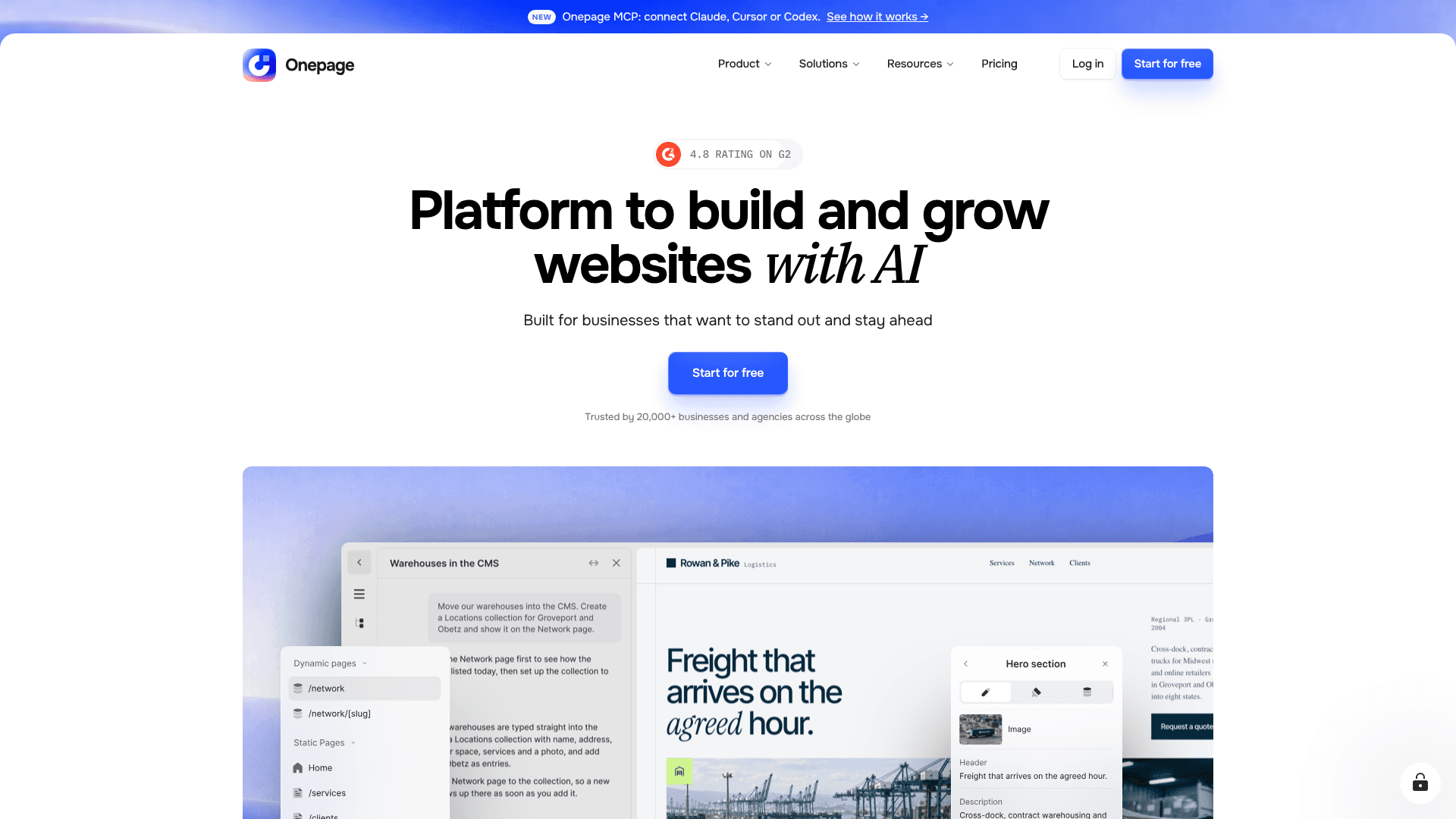
Onepage is a no-code website platform built by Onepage GmbH in Frankfurt am Main, founded in 2018, that builds landing pages, multi-page marketing sites with a blog, multi-step funnels, quizzes and linktrees. The company reports more than 1.2 million pages built and more than 20,000 customers (self-reported, October 2026). Its own positioning line — “the website-building tool you’ll enjoy using” — is aimed squarely at agencies and businesses rather than at developers.
The useful way to think about it: Onepage is not competing with Wix or Squarespace for the general-purpose small-business site. It is competing for the page you need live by Friday. Everything required to run that page ships in the box — hosting, your own domain, a built-in CRM that catches form submissions, and analytics that track each step of a multi-page sequence.
The other structural fact worth knowing is where the data lives. Onepage hosts on EU servers and is GDPR-compliant, including a data processing agreement and full data deletion on request (Onepage product documentation, July 2026). If you are an agency collecting client leads inside the EU, that removes a conversation you would otherwise have to have about every US-hosted builder. The interface ships in six languages: German, English, Ukrainian, Polish, Spanish and French.
Onepage Features: What Actually Works
The AI Writer is the feature that earns its keep
Onepage’s AI Writer was the most convincing AI feature we tested. Select any text block and a floating toolbar appears with the AI Writer alongside text size, heading level and SEO controls. Opening it gives you a free-text prompt box plus one-click actions: Quick improve, Fix spelling & grammar, Make shorter, Make longer, and Change tone.
We asked it to rewrite a template headline for a fictional Brooklyn bakery. It returned a usable, on-brand headline in about three seconds, and — the detail that matters — it showed the result with an explicit Accept or Decline step before touching the live copy. That is the difference between an AI tool you leave switched on and one you turn off after a week. One quirk to know: it generated the rewrite in German to match the template’s default language even though our prompt was in English. Sensible for consistency, surprising the first time. Rating: 9/10.
AI page and section generation stays editable afterwards
Onepage’s AI 2.0 release generates whole sections from a short description, and the output lands in the visual editor as normal, fully editable sections rather than a locked-in result. Each generated section gets its own control panel for text, colours, spacing and behaviour, and missing controls can be added by prompt. Generation runs as a background agent workflow, so you can keep editing while sections build.
This is the right architectural call, and it is the main thing separating Onepage from one-shot AI generators where reworking the output is harder than starting over. The honest caveat is that section generation consumes AI credits, metered monthly by plan — 25/mo on Essential up to 75/mo on Expert (official pricing, October 2026). Heavy generative use is the one place where the sticker price understates the real cost. Rating: 8.5/10.
You can build a Onepage site from inside Claude
Onepage exposes an MCP (Model Context Protocol) connector, which is genuinely unusual for a website builder. You add it in Claude under Settings, Connectors, Browse connectors, then authorise with your Onepage login, after which Claude can manage pages, content, site structure and CMS collections directly. It also works from ChatGPT and Cursor. Onepage’s help documentation states that this runs on your own Claude subscription and does not consume Onepage AI credits — which quietly makes it the cheapest way to use AI generation heavily on the platform.
We did not test the MCP connection ourselves in this pass, so treat the workflow as documented rather than verified here. MCP is now included on every plan, Free included. If you already work in Claude, this is the most forward-looking thing on the page. Rating: 8/10 (documented, untested).
New in October 2026: a native CMS, a blog and the Onepage Agent
The 28 October 2026 release closes the biggest gap in the first version of this review. Onepage now has a native CMS: collections with custom fields (text, rich text, image, gallery, video, date, relations and more), from which Onepage generates the overview and detail pages automatically — a /blog listing and individual /blog/post pages, for example — with an SEO title and description per entry. Blogs, service and location pages, team pages and catalogues can now live in Onepage, and one site can grow to 100+ subpages without a second tool. Limits scale by plan, from 3 collections and 25 records on Free to 200 collections and 20,000 records on Expert.
The same release adds the Onepage Agent, an AI chat in the dashboard and editor that runs almost every function in the account: websites, pages, sections, domains, SEO, CMS and leads. Onepage’s own examples are building a complete blog from one prompt, or updating opening hours and prices across every page at once. A new vibe coding mode also generates custom sections and logic as code from a prompt.
These features shipped after our hands-on testing, so treat them as documented rather than verified here. A CMS that is weeks old is not yet a match for Webflow or WordPress on a large editorial site, but for a business that needs a blog and a set of service pages next to its landing pages, the reason to run a second tool is gone. Rating: not yet scored (documented, untested).
Templates that look like agency work
The template gallery was a stronger first impression than we expected. Templates are organised by category — landing pages, Forms & Funnels, agency starter kits — and the ones we opened had modern typography, credible photography, sensible section rhythm and mobile-aware layouts. They read as designed, not as builder-default filler. For agency work where the client judges the first draft in ten seconds, that is worth more than a longer feature list. Rating: 9/10.
CRM, forms and funnels are built in — partly as an add-on
Form submissions land in a built-in CRM instead of an inbox, and analytics track conversion through each step of a multi-page sequence such as landing page to form to thank-you page. That is the core licence. Multi-step forms, quizzes and full conversion funnels sit behind the paid Forms & Funnels add-on, which runs from €39.99/mo (Launch) to €99.99/mo (Expand) per Onepage’s July 2026 product documentation. Budget for it if funnels are the reason you are buying. Rating: 8/10.
Interface and Learning Curve
Getting started in Onepage takes under a minute. You click the plus button, choose between starting from scratch, creating a site with AI, or picking a template, name the project, and Onepage assigns a subdomain automatically. There is no setup wizard to sit through and no configuration to do before you see a page.
Inside a populated page the editor feels modern and responsive: inline text editing, a floating context toolbar that follows your selection, and — a detail most builders get wrong — semantic heading controls that set actual H1 through H6 levels rather than only visual sizes. That one choice is why pages built here do not need SEO cleanup later. A Themes and settings panel carries a light/dark editor theme and a Pro mode toggle that unlocks advanced tools, so the interface can start simple and get denser as you learn it.
Under the hood it is a heavier micro-frontend architecture than the interface suggests, which explains the occasional loading pause when moving between screens. It is not slow in use, but it is not instant either. The one area reviewers consistently mark down is the mobile editor, which is weaker than the desktop experience — edit on a laptop and preview on a phone rather than the other way round.
Onepage Pricing: What It Really Costs
Onepage prices a core licence — building, hosting, domain, CRM and analytics — and then lets you expand it, rather than bundling everything into one large plan. Since October 2026 there are three billing terms: monthly, 12 months (up to 25% off) and 24 months (up to 50% off), with the longer terms paid upfront. Monthly prices did not change, and the old flat 17% annual discount is gone. Prices are net and identical in USD and EUR; EU hosting, SSL and a CDN are included on every plan. All figures below are from Onepage’s official pricing, October 2026.
| Plan | Monthly | 12 Months | 24 Months | Websites | Pages | AI Credits | Notes |
|---|---|---|---|---|---|---|---|
| Free | $0 | $0 | $0 | 1 | 5 | 20 (one-time) | No custom domain, Onepage subdomain only. Includes the AI Agent, vibe coding and MCP; 3 CMS collections, 25 records. |
| EssentialBest value | $19.90/mo | $14.90/mo | $9.90/mo | 1 | 100 | 25/mo | First tier with a custom domain and SEO tools. GDPR consent, Global Sections and Conversion API now included. 8 CMS collections, 500 records, 1 editor. |
| Standard | $39.90/mo | $29.90/mo | $24.90/mo | 2 | 200 | 35/mo | Website transfer. 25 CMS collections, 2,000 records, 1 editor. |
| Advanced | $69.90/mo | $59.90/mo | $49.90/mo | 5 | 500 | 50/mo | 60 CMS collections, 5,000 records, up to 3 editors. |
| Expert | $179.90/mo | $149.90/mo | $129.90/mo | 20 | Unlimited | 75/mo | Priority support, access management. 200 CMS collections, 20,000 records, up to 5 editors. |
Where the real cost hides. Three things sit outside the table. Extra websites cost about $8/mo each, extra editor seats run $3–4/mo each, and extra AI credit packs are priced separately. On top of that, the Forms & Funnels add-on — the one that unlocks multi-step forms, quizzes and conversion funnels — is a second line item running €39.99/mo to €99.99/mo. An agency buying Onepage specifically for funnels should model the core licence plus the add-on, not the headline price. Both the add-on and extra AI credits can be added to any plan.
Which plan to pick. Essential is the honest starting point: $19.90/mo month-to-month or $9.90/mo on a 24-month term, and the first tier with a custom domain and SEO tools. After the October 2026 changes it also includes 100 pages, 8 CMS collections, GDPR consent tooling, Global Sections and Conversion API tracking — features that used to sit on Standard and Advanced — which makes it enough for most single-site businesses, blog included. Standard at $39.90/mo ($24.90 on 24 months) fits a freelancer with two client sites. Advanced at $69.90/mo ($49.90) adds five websites and three editor seats, which is where small agencies land. Expert at $179.90/mo ($129.90) only pays for itself at 20 sites and five editors. Compared with the category — Framer from $10/mo, Wix from $17/mo, Squarespace from $16/mo — Onepage sits mid-table on monthly price and undercuts all three on a 24-month term, while bundling a CRM none of them include.
We Test Tools So You Don’t Have To
Every week we put one tool through real work and report what actually held up. No affiliate fluff, no feature-list regurgitation.
What Onepage Users Actually Say
Onepage holds 4.9/5 on G2 across 71 reviews and 4.9/5 on Capterra across 76 reviews, with an ease-of-use sub-score of 4.8 and a customer-service sub-score of 4.9 (checked August 2026). On the German review site OMR it sits at 4.8/5 from 15 reviews. Those are small review counts by category standards — Wix has thousands — but the consistency across three independent platforms is notable.
The praise clusters tightly around three things: speed, ease of use for non-technical staff, and support. Support in particular comes up in nearly every positive review, and reviewers describe it concretely rather than generically — fast responses, screen recordings, direct fixes. In a category where support usually means a chatbot and a help-centre link, that is a real differentiator rather than a marketing claim.
The complaints are equally consistent, which makes them credible. Design flexibility comes first: reviewers want more control over fonts and graphics than the component kit allows. Missing blog and CMS features came second, a gap the October 2026 CMS release is aimed squarely at. White-label gaps for agencies, a weaker mobile editor, thin native integrations outside Zapier and Make, and pricing described as “a little high” for lighter use round out the list. None of these are reliability complaints, which is itself informative.
“It’s very easy to use and therefore the results are very nice!”
“User Experience and features. There are many features that help getting high quality leads”
“We dislike that we are limited in certain segments e.g. graphics and fonts”
Onepage Pros and Cons
Pros
- Templates and AI-generated sections look like paid design work, not builder-default filler
- The AI Writer rewrites copy in about three seconds and asks before it touches the page
- Support is the single most-praised thing about Onepage across every review platform (4.9/5 for customer service on Capterra)
- Hosting, custom domain, CRM and analytics are bundled, so there is no second subscription to stitch in
- You can build from Claude, ChatGPT or Cursor over MCP using your own AI subscription, without spending Onepage AI credits
- A native CMS (October 2026) generates blog, service and location pages with per-entry SEO fields, so one site can grow past 100 subpages
- The Onepage Agent runs almost any account task from a chat prompt, from building a blog to updating prices on every page
- EU servers, GDPR compliance, a DPA and full data deletion on request
- Ships fast: multiple releases a month, including Forms & Funnels 3.0 and an overhauled domain manager
Cons
- Design flexibility has a ceiling — fonts and graphics are the most common complaint in user reviews
- The CMS and Agent are brand new (October 2026) and less proven than Webflow or WordPress for large content sites
- Native integrations are thin outside Zapier and Make
- The real monthly cost climbs once you add Forms & Funnels or extra AI credits on top of the core licence
- The lowest prices need a 12- or 24-month term paid upfront
- The Free plan has no custom domain, so it works as an extended trial rather than a permanent tier

How We Scored Onepage
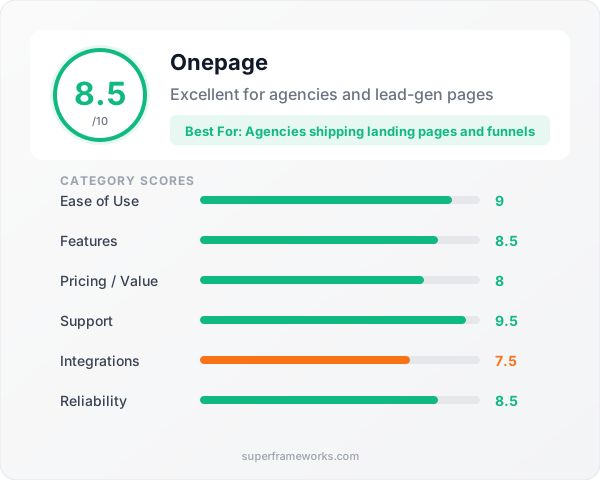
Ease of Use
9/10
Features
8.5/10
Pricing / Value
8/10
Support
9.5/10
Integrations
7.5/10
Reliability
8.5/10
Weighted for builders and small teams: features and value carry 25% each, ease of use and support 15% each, integrations and reliability 10% each. Scores reflect hands-on testing on a paid account plus verified third-party review data.
Who Should Use Onepage?
Buy Onepage if you are an agency or freelancer shipping client pages. The combination that makes sense here is specific: templates good enough to present as a first draft, an editor a non-designer on your team can update, one editor seat from Essential and three on Advanced, and a CRM that catches the leads the page generates. Five seats on Expert covers a small agency without per-user negotiation.
Buy Onepage if lead capture is the point of the page. Multi-step funnels, quizzes and step-level conversion tracking are first-class here in a way they are not in general-purpose builders. Add the Forms & Funnels add-on and this replaces a separate funnel tool.
Buy Onepage if you operate in the EU. EU hosting, a DPA and built-in consent tooling from the Essential plan up make the compliance conversation short.
Think twice if content is the main product. Since October 2026 Onepage has a native CMS and blog, which is enough for a company blog, service pages and location pages next to your landing pages. A large editorial site with hundreds of articles and complex content models still belongs in Webflow or WordPress until the new CMS has a track record. Skip Onepage if your design is genuinely bespoke — the component kit is a floor and a ceiling at the same time.
Onepage vs the Alternatives
Onepage vs Framer
Framer produces broader, more design-forward output and starts cheaper at $10/mo, but you supply your own CRM, forms and funnel logic. Pick Framer when the page itself is the pitch; pick Onepage when the page exists to capture leads.
Onepage vs Webflow
Webflow gives you near-total design control and a mature CMS, at the cost of a much steeper learning curve. Onepage added its own CMS in October 2026, which covers blogs and service pages, but Webflow’s is still deeper for large content sites. Reviewers consistently rate Onepage higher on ease of use and time-to-launch, and lower on design depth. If a non-designer on your team has to update the page next month, that trade favours Onepage.
Onepage vs Wix and Squarespace
Both are broader platforms with e-commerce and bookings built in, which Onepage deliberately does not do. They are the better call for a general small-business site. Onepage is the better call for an agency shipping campaign pages and quiz funnels on a deadline.
For the full field, see our ranked best AI website builders guide, our narrower list of AI landing page builders for SaaS founders, or the best Webflow alternatives if you are leaving a heavier tool.
The Verdict: 8.5/10
Onepage earns 8.5/10 because it is honest about what it is. It is not trying to be your store or your marketing suite, its new CMS is scoped to what a marketing site needs rather than to a publishing platform, and every design decision follows from that — the narrow feature set, the bundled CRM, the funnel tooling, the speed. Judge it against the job it claims and it does that job better than most tools costing more.
What stands out after hands-on testing is the quality of the small decisions: the accept-or-decline step before AI touches your copy, semantic heading controls instead of visual-only sizing, templates that survive a client presentation, and an MCP connector that lets you drive the whole thing from Claude on your own subscription. Those are the marks of a team that ships thoughtfully, and the changelog — multiple releases a month — backs that up. The October 2026 release, a native CMS plus an AI agent that can run the whole account, continues the pattern; we will re-score once we have tested both hands-on.
The reservations are real but bounded. Design flexibility runs out earlier than in Framer or Webflow, the CMS is too new to judge at scale, native integrations are thin, the cheapest prices need a long upfront term, and the true cost climbs once Forms & Funnels and extra AI credits are added. None of those are surprises — they are the predictable trade of a focused tool. Start on the free plan, build one real page, and you will know within an hour whether the ceiling matters for your work.
Get the Next Review First
One tool, tested properly, every week. Join founders and agency owners who read it before they buy.
Onepage Review FAQ
Is Onepage worth the price?
Onepage is worth it if you publish marketing pages regularly rather than once. At $19.90/mo month-to-month, or $9.90/mo on a 24-month term (Essential, official pricing, October 2026), you get a custom domain, hosting, the AI writer, SEO controls, a built-in CRM, analytics and now a native CMS with a blog in one subscription — pieces that usually cost two or three separate tools. It stops being good value if you need one static site and never touch it again, or if you run a large editorial site that needs a more mature CMS than one released in October 2026.
Does Onepage have a free plan?
Onepage has a permanent free plan with no credit card required: one website, five pages, a Onepage subdomain, the CRM, website analytics, 20 one-time AI credits, and — since October 2026 — the AI Agent, vibe coding, MCP and three CMS collections with 25 records (official pricing, October 2026). The catch is the missing custom domain — you cannot publish under your own URL until the Essential plan ($19.90/mo, or $9.90/mo on a 24-month term). Treat the free tier as an unlimited-length trial for judging the editor rather than as a place to run a real site.
How do agencies rate Onepage’s AI page builder for producing client landing pages quickly?
Agencies rate Onepage highly on exactly this job: it holds 4.9/5 on G2 (71 reviews) and 4.9/5 on Capterra (76 reviews, ease of use 4.8), where the recurring praise is speed and the ability of non-technical staff to build professional pages without a designer. In our own testing, creating a project and getting to an editable, well-designed template took under a minute, and the AI Writer returned an on-brand headline rewrite in roughly three seconds with an accept-or-decline step before it changed anything. The consistent limit agencies report is design depth — one Capterra reviewer put it as being “limited in certain segments e.g. graphics and fonts” — so it suits template-plus-brand-kit client work better than fully bespoke design.
Can you build a Onepage website using Claude?
Yes. Onepage exposes an MCP (Model Context Protocol) connector that you add in Claude under Settings, Connectors, Browse connectors, then authorise with your Onepage login. Once connected, Claude can manage pages, content, site structure and, since October 2026, CMS collections directly, and Onepage’s documentation states this runs on your own Claude subscription without consuming Onepage AI credits. The same connector works from ChatGPT and Cursor. Anything Claude builds stays fully editable in the visual editor afterwards. MCP is included on every plan, Free included.
Does Onepage have a blog or CMS?
Yes, since 28 October 2026. Onepage’s native CMS uses collections with custom fields (text, rich text, image, gallery, video, date, relations and more) and generates the overview and detail pages automatically — a /blog listing and individual /blog/post pages, for example — with an SEO title and description per entry. It covers blogs, service and location pages, team pages and catalogues, and lets one site grow to 100+ subpages. Limits scale by plan, from 3 collections and 25 records on Free to 200 collections and 20,000 records on Expert. The new Onepage Agent can build a complete blog from one prompt. We have not yet tested the CMS hands-on, and for a large editorial site Webflow or WordPress remain the more proven choice.
What is the best Onepage alternative?
The best Onepage alternative depends on what Onepage is missing for you. Choose Framer if design range matters more than bundled lead capture — it produces the most polished output of any AI builder and starts at $10/mo. Choose Webflow or WordPress if you run a large, content-heavy site and need a mature CMS — Onepage’s own CMS, added in October 2026, covers a company blog and service pages but has no track record yet. Choose Wix or Squarespace if you want e-commerce and bookings in one mainstream platform. Onepage wins over all of them on a narrower job: landing pages and multi-step funnels with the CRM already attached, and now the blog beside them.
Is Onepage GDPR compliant and where is data hosted?
Onepage is operated by Onepage GmbH in Frankfurt am Main, hosts on servers inside the EU, and is GDPR-compliant, including a data processing agreement and full data deletion on request (Onepage product documentation, July 2026). For agencies handling client leads in the EU, that is a meaningful differentiator over US-centric builders, and every paid plan from Essential up includes a built-in GDPR consent solution.
Related Reading
- 10 Best AI Website Builders in 2026 — Where Onepage ranks against the whole field
- Best AI Landing Page Builders for SaaS Founders — The narrower list, focused on conversion pages
- Best Webflow Alternatives — If you are leaving a heavier, more technical builder
Sources
- Onepage — Official Site
- Onepage — Pricing Plans
- Onepage — Connect Claude with Onepage MCP (Help Center)
- Onepage — Vibe Coding Prompting Guide (Help Center)
- Onepage — Reviews (Capterra)
- Onepage — Reviews (G2)
Pricing updated from Onepage’s official October 2026 pricing and release information. Ratings checked on G2 and Capterra in August 2026. Hands-on testing was carried out on a paid Onepage account; the CMS and Onepage Agent (released 28 October 2026) have not yet been tested hands-on.
Stay Ahead of the Tool Curve
We research dozens of tools so you don’t have to. Get our top picks and insider insights delivered weekly.
Trusted by indie hackers and startup founders